From vectors to pixels
Work with vectors, layers and indexed pixels. Save PNGs, sprite sheets and bundles you can reopen.
Create in the same document as AI. Step in and make it yours whenever you want. A new way to work, right on your computer.
Watch how models create. Compare a prompt across models or explore one model’s work.
Meet the first tool in the collection.
Vector, pixel, MIDI and audio.
A local creative tool for people and AI.
In a standalone app on your desktop.
One document, one history, a shared process.
Work with vectors, layers and indexed pixels. Save PNGs, sprite sheets and bundles you can reopen.
Edit MIDI notes and tracks, plus WAV/MP3 audio clips. Export MIDI and WAV. MIDI instrument playback is still planned.
Record your 2D process and prompts, then export a sped-up MP4. MP4 export requires a separate FFmpeg installation.
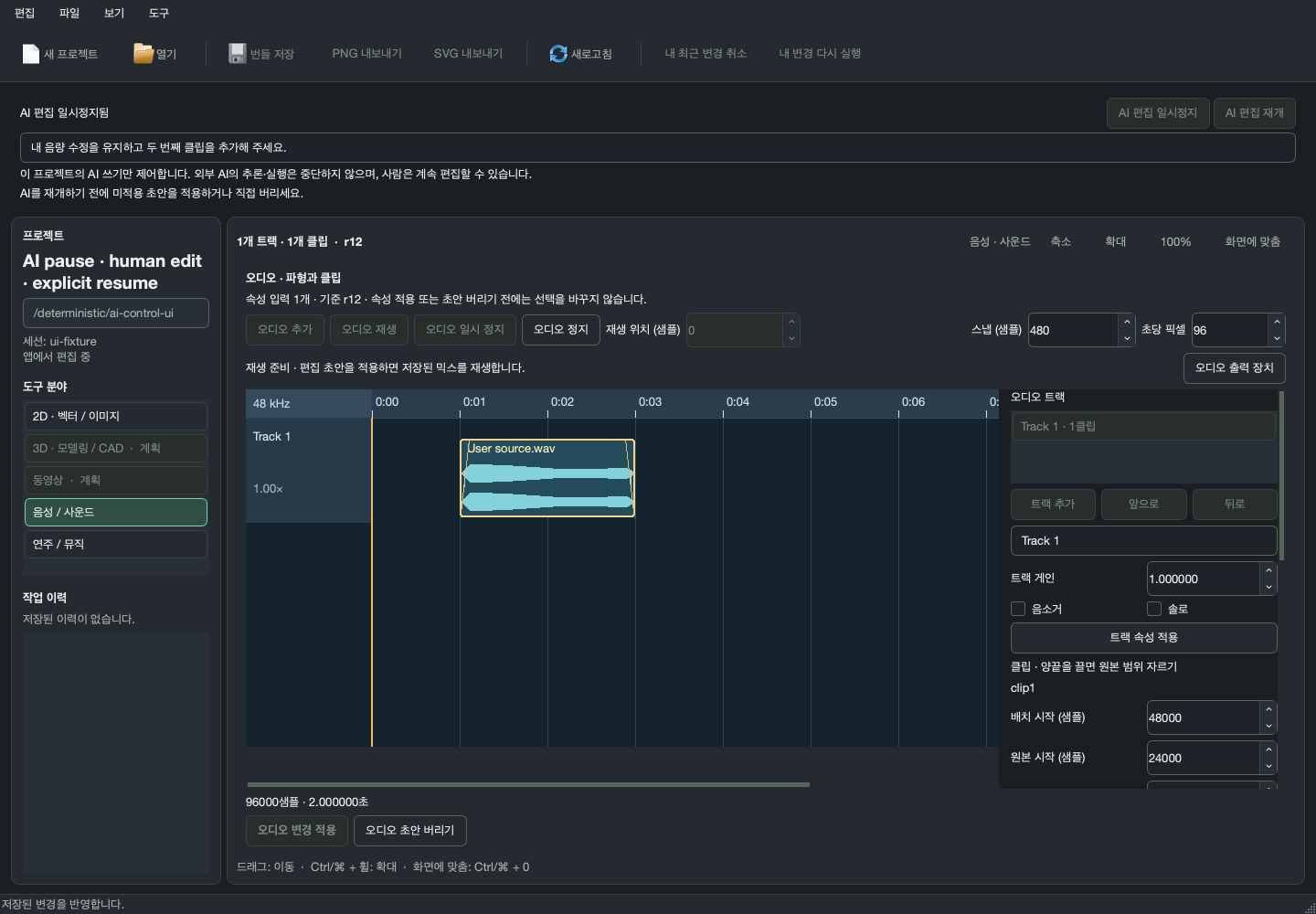
Pause AI write access, edit directly, then hand over the current document and your instructions.
Uses an external AI client through MCP. No built-in AI chat. Pausing writes does not stop external model inference or billing.Let the current batch settle safely.
Keep what matters. Refine it your way.
Leave instructions and continue in your external AI client.
CanvasOK · Multilingual invocation names & custom aliases experimental build · Oct 16, 2026
arm64 · ZIP · 85.6 MB
Download experimental build ↗Experimental build without public signing or notarization. Runtime verified on macOS arm64.Runtime & installer pending
Not yet availableA verified installer will be listed here when ready.Runtime & installer pending
Not yet availableA verified installer will be listed here when ready.4888eb7a2d3892a11ccd0de265dd569056df7b86a37bc1a5794792cb45d2d609SHA256SUMS ↗Download manifest ↗Unzip the Apple Silicon build and open CanvasOK. Create a document or open a file or bundle, edit, and save a bundle to continue later. AI collaboration requires a separate MCP client connection. External vector/raster engines and FFmpeg for MP4 are not bundled.
Call it 캔버스오케이, CanvasOK, キャンバスオーケー or 画布OK, and register your own aliases. Manage them in Tools → Invocation names and aliases; naming instructions are delivered to connected MCP harnesses. Restart MCP and open a new conversation if a new alias is missing. The app UI supports Korean and English.
Current scope covers vector/layer, pixel, MIDI and audio editing, plus 2D process recording. 3D, full video editing, speech recognition/synthesis and MIDI instrument rendering are planned. First-party code is MIT; engines, fonts and media have their own terms. A public source repository will be linked once confirmed.
Share feedback, report a bug or get in touch.